


scan my tesla
4.168.00 Reviews
App Specs
- Version
- 3.2.3
- Updated On
- License
- $9.99
- Downloads
- 10,000+
- Developer
- Børsand Engineering
- Categories
- Auto & Vehicles
- Platform
- Android
Screenshots
 Analysis by AppCompare
Before deciding whether Scan My Tesla is right for you, there is one practical point I would put ahead of every feature: the app depends on extra hardware. You need an adapter cable and a compatible OBD2 adapter, so this is not something you can install and use on its own. If you already enjoy working with diagnostic gear, that requirement may feel routine. If you expected to download an app and immediately see more information on your phone, it changes the calculation.
That dependency also explains what makes this tool different from the screens Tesla owners use every day. The car’s built-in displays focus on information useful while driving; a diagnostic app is for someone who wants to inspect vehicle data more closely. I see the appeal less as a replacement for Tesla’s normal interface and more as an optional window for curious owners who are comfortable adding a cable and adapter to their setup.
Check the equipment before you buy
Before paying for the app, I would identify the adapter cable and OBD2 adapter it needs and make sure the combination is suitable for your Tesla. This is the key purchase decision: the app’s usefulness depends on getting the hardware side right. A Bluetooth adapter by itself should not be treated as proof that everything is ready, since the cable is part of the stated setup too.
That is a less convenient starting point than a typical car companion app, where signing in may be enough to begin. Here, the process has an extra physical step, and that can make a quick first test less spontaneous. I would treat the cable and adapter as part of the overall cost and setup effort rather than as minor accessories. If you do not want to research or handle diagnostic hardware, this may not be the right choice for you.
What diagnostic detail is useful for
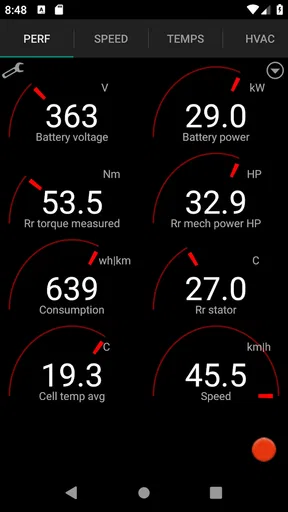
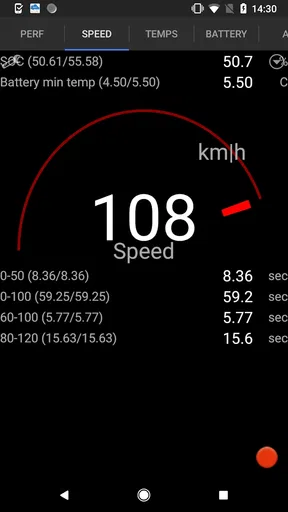
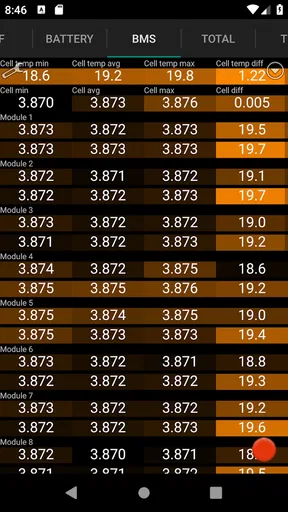
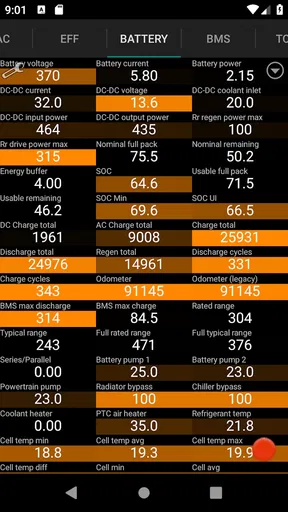
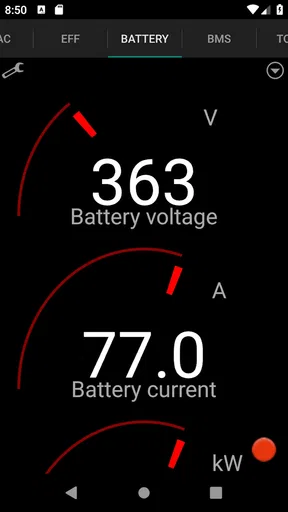
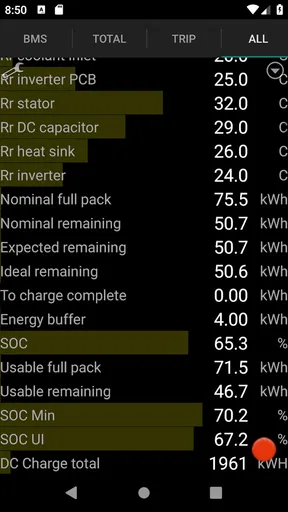
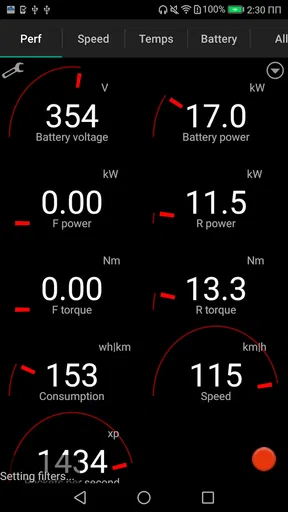
The strongest reason to look at this app is its focus on information below the everyday driving interface. In the original experience, battery condition, temperatures, motor figures and state of charge stand out as examples of the kind of detail an owner may want to inspect. Seeing more than a single dashboard reading can make a technical question easier to investigate, especially for someone who enjoys understanding how an electric car behaves rather than simply getting from one place to another.
I would still be careful about how I interpret diagnostic readings. A changing temperature or a figure that catches your eye is a prompt to understand the context, not automatically evidence of a fault. The practical value is that you can observe and compare what the app shows; it does not turn every reading into a diagnosis or replace qualified service advice. That distinction matters most for new owners, who may otherwise mistake normal variation for a problem.
A useful routine, not a dashboard replacement
For a more deliberate check, I would connect when parked, look at the readings I actually care about, and avoid trying to study detailed figures while driving. If I were tracking a concern, I would note when I checked and what the car was doing at the time. That gives later comparisons a little context and is more useful than repeatedly opening the app without a question in mind.
Worth Reading Before You Choose

Baby Panda World Brings Quick Play to Modern Phones, but Its Game Library Feels Busy

ESPN’s Live Game View Makes Following Close Games Easier

QuizzLand Review: A Good Fit for Short Trivia Breaks, Not Every Player

Basketball Stars: Multiplayer Is Fast, but Can It Recover When Matches Go Wrong?

WEBTOON Turns Phone Updates Into a Better Reading Routine

Link to Windows Runs on Shared Habits, Not Social Feeds
Historical information can make that routine more meaningful: rather than relying entirely on memory, you can look back at how the car has been performing. I would use that as a record to notice patterns, not as a reason to assume a single change signals trouble. For a long journey, the state-of-charge view may be interesting alongside the car’s normal trip planning, but I would keep the built-in driving tools as the practical source for route decisions. The diagnostic view is most helpful when you want to inspect, not when you need to keep your attention on the road.
Where it fits among Tesla tools
Compared with the standard vehicle interface, Scan My Tesla is aimed at owners who want a more technical look, not a simpler way to do everyday driving tasks. Compared with a general-purpose OBD2 reader, its Tesla focus is the point of difference, while the required adapter setup is a trade-off. A broad vehicle scanner may suit someone who works across different makes; this app makes more sense to a Tesla owner whose interest is specifically in that car’s data.
There is also a difference between this and simply checking the car’s normal displays. The built-in interface is easier to reach and already fits ordinary use, while an added diagnostic app asks you to set up hardware and learn which readings matter to you. I would not install it expecting a more polished version of the everyday Tesla screen. I would choose it for the extra depth, then use the regular interface for routine driving and quick checks.
Who is likely to get value from it?
I think the best fit is an owner who likes to learn how the car behaves, is willing to arrange the required hardware, and has a specific reason to examine readings over time. That might be someone comparing battery information across different conditions, keeping an eye on a recurring question, or simply satisfying a genuine interest in the engineering of an EV. A technically curious driver can get more from it than someone who only wants basic trip information.
On the other hand, I would skip it if you want a no-accessory setup, rarely look beyond the car’s standard screens, or are likely to worry over every number without knowing what it means. It is also a poor match if what you really need is a repair decision: a diagnostic display can inform a conversation, but it should not be treated as a mechanic’s inspection. The adapter requirement and the need to interpret readings are real parts of the experience, not hurdles everyone will find worthwhile.
Cost, compatibility and expectations
The app costs $9.99, so I would decide whether its specialized use justifies that spend before buying the extra hardware. It is an Auto & Vehicles app from Børsand Engineering, and it has an average rating of 4.2 from 424 ratings, with 67 reviews and over 10K installs. Those figures suggest a small, focused audience rather than a tool every driver needs; I would weigh the app against my own interest in Tesla diagnostics rather than assume popularity alone makes it essential.
It is rated for Everyone and was released on July 21, 2017. Version 3.1.4 requires Android 5.0 or later. Those details can help Android users check basic compatibility, but the adapter and cable remain central to whether the app will work for their setup. I would verify the hardware before treating a compatible phone as a complete setup.
Getting Started with Scan My Tesla
First things first, setting up Scan My Tesla was a breeze. You’ll need a Bluetooth OBD2 adapter, which might sound fancy, but it’s basically a little gizmo that lets your car talk to your phone. Once you’ve got it, just plug it into your Tesla, and you’re good to go. The app itself is available on both Android and iOS, so no worries if you’re team Apple or Android.
A Peek Under the Hood
Once I fired up the app, I was blown away by the sheer amount of data it provides. We’re talking battery health, temperature readings, even motor torque figures. It’s like having a virtual mechanic with you 24/7. For anyone who loves data, this app is a treasure trove. You can monitor your battery’s state of charge in real-time, which is super handy for planning those long road trips.
What’s really cool is the historical data feature. You can look back at how your car has been performing over time, which can be a lifesaver if you start noticing any weird behavior. It’s like having a diary for your car!
User Experience: Smooth as a Tesla
The interface is pretty intuitive, which is great for someone like me who isn’t exactly a tech wizard. Everything is laid out in a way that makes sense, and the app runs smoothly without any hiccups. I didn’t encounter any crashes or bugs, which is always a plus.
One little tip: make sure your phone’s Bluetooth is on! I made that rookie mistake and couldn’t figure out why the app wasn’t connecting at first. Once I got that sorted, it was smooth sailing.
Why You’ll Love It
If you’re like me and love knowing every little detail about your Tesla, this app is a must-have. It’s not just for tech geeks, though. Even if you’re new to the whole EV scene, the insights you get from Scan My Tesla can help you become a more informed driver. Plus, it’s just plain fun to see what’s happening under the hood while you’re cruising down the highway.
And let’s be honest, having all this data at your fingertips makes you feel a bit like Tony Stark. Who doesn’t want to feel like Iron Man when they’re driving?
Why the extra view can matter
A realistic use for the app is a parked check after you notice something you want to understand better. You could connect the hardware, look at relevant readings, and then revisit them later rather than relying on a vague impression. If the same question comes up again, the historical view may help you describe what you observed when talking with a service professional. I find that more grounded than treating a single screen as a verdict.
There is a useful trade-off here: more visibility can make an owner feel informed, but it also creates more opportunities to fixate on numbers that need context. I would choose a small set of readings tied to a real question and ignore the rest until there is a reason to explore them. That approach makes a data-heavy tool less overwhelming and keeps curiosity from turning into unnecessary worry.
Questions to settle before relying on it
The first thing I would ask is whether the necessary cable and adapter are already available and appropriate for my car. If not, I would research that before buying the app. The next question is what I hope to learn: if the answer is simply basic charge status or ordinary trip planning, the vehicle’s usual tools may be enough. If I want a deeper look at diagnostic information, this app has a clearer purpose.
I would also ask whether I am comfortable treating readings as information to interpret rather than instructions to repair something. If a result seems concerning, I would use it to frame a sensible follow-up, not to make a mechanical decision on my own. Finally, I would consider how often I expect to use it. Someone who enjoys occasional checks and keeps notes may find the price worthwhile; someone who opens it once out of curiosity may not get enough lasting value.
The Bottom Line
All in all, Scan My Tesla is a fantastic tool for any Tesla owner. It’s informative, easy to use, and gives you insights that you simply can’t get from the car’s standard interface. Whether you’re a data nerd or just someone who wants to make sure their car is in tip-top shape, this app is well worth the download.
So, if you’re ready to dive deeper into what makes your Tesla tick, give Scan My Tesla a try. Who knows? You might just learn something new about your car—and maybe even yourself.
Pros
- Detailed vehicle diagnostics
- Real-time data updates
- User-friendly interface
- Customizable settings
- Compatible with multiple models
Cons
- Requires specific hardware
- Limited support for older models
- Occasional connectivity issues
- No offline functionality
- UI can be overwhelming at first
FAQs for scan my tesla
What is Scan My Tesla and how does it work?
Scan My Tesla is an app designed to provide detailed insights into your Tesla vehicle's performance and data. It connects to your car using a Bluetooth OBD-II adapter, allowing you to monitor battery health, efficiency, and other vehicle diagnostics in real-time. This can be particularly useful for Tesla enthusiasts who want to track their vehicle's performance closely.
Is Scan My Tesla compatible with all Tesla models?
Scan My Tesla is compatible with most Tesla models, including Model S, Model 3, Model X, and Model Y. However, compatibility might vary depending on the model year and firmware updates. It's recommended to check the app's official website or support documentation for the most current compatibility information before purchasing any adapters or the app.
What hardware is required to use Scan My Tesla?
To use Scan My Tesla, you need a Bluetooth OBD-II adapter that can connect to your Tesla. Popular choices include the OBDLink LX or MX+, but it's crucial to verify compatibility with your specific Tesla model. Additionally, you will need a smartphone or tablet with the app installed to view the data collected from your vehicle.
Is the data collected by Scan My Tesla secure and private?
Scan My Tesla prioritizes user privacy by storing all data locally on your device. It does not upload any information to external servers or cloud storage, ensuring that your vehicle's data remains secure and private. Users should ensure their device's security for additional protection, especially if using public or shared networks.
Are there any subscription fees or additional costs for using Scan My Tesla?
Scan My Tesla is a one-time purchase app, meaning there are no recurring subscription fees. However, users must purchase a compatible Bluetooth OBD-II adapter separately. It's also advisable to consider any future updates or additional features that might incur costs, although current updates are typically included in the initial purchase.


